التمحور حول الإنسان
المتعامل أولاً في جميع أعمالنا.


توفر إرشادات البحث الأدلة اللازمة لاتخاذ قرارات تصميم مبنية على معرفة دقيقة.
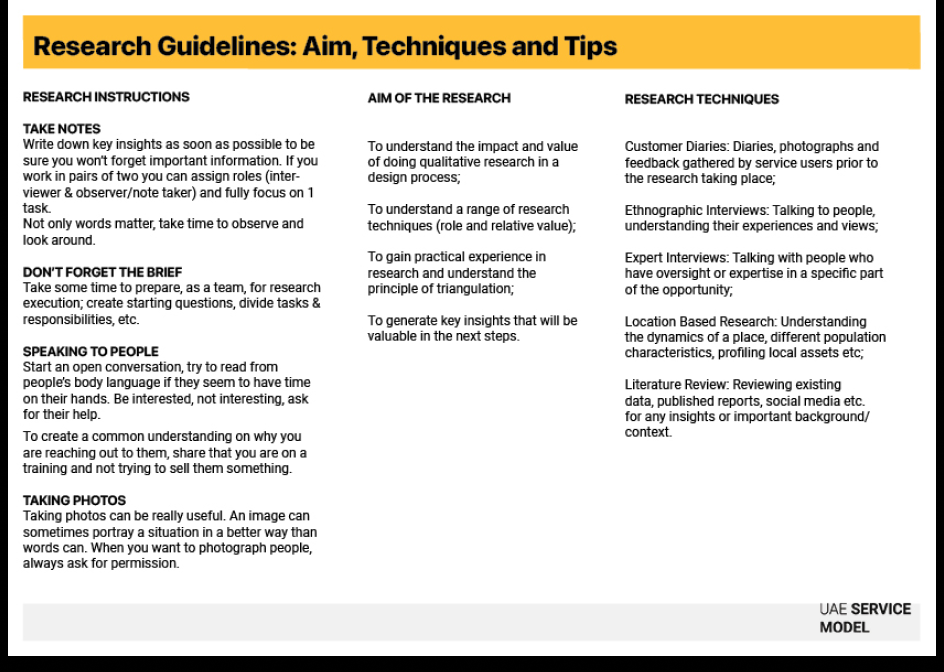
توفر الأبحاث الأدلة اللازمة لاتخاذ قرارات تصميم مبنية على معرفة دقيقة. وتنقل عملية التصميم من التخمين إلى اليقين، من خلال جمع بيانات واقعية حول احتياجات المتعاملين وسلوكياتهم والواقع التشغيلي للخدمات. كما تنظم هذه الإرشادات إجراء الأبحاث النوعية، وتساعد الفرق على تجاوز الإحصاءات السطحية لفهم السياق الحقيقي لتجربة الخدمة.

تختلف بحسب النطاق (من يوم واحد للأبحاث السريعة إلى عدة أسابيع للدراسات المتعمقة).

من المبتدئ إلى المتقدم (بحسب نطاق البحث).

الاستكشاف

ملخص المشروع

خطة البحث ونماذج الموافقة وأدلة المقابلات وقوالب تدوين الملاحظات وأجهزة التسجيل الصوتي والكاميرات ونماذج الملاحظة وأدوات التوثيق الرقمية

باحثو التصميم ومصممو الخدمات والمسؤولون عن المنتجات وموظفو الصفوف الأمامية وصناع السياسات وخبراء المحتوى المتخصصون
وضّح ما الذي تحتاج إلى تعلمه ولماذا تتعلمه. اجعل تركيز البحث متوافقاً مع تحدي التصميم، سواء كان الهدف فهم احتياجات المتعاملين أو اختبار النموذج الأولي أو تقييم الخدمة القائمة.
راجع ملف المشروع وحدّد الأدوار (محاوِر ومراقب ومدوّن ملاحظات). طور أسئلة مفتوحة واتفق على آلية مشاركة النتائج داخل الفريق.
اختر تقنيات البحث بناءً على الوقت والنطاق والفئة المستهدفة.
المقابلات الميدانية السلوكية: افهم التجارب المعيشية والسياق العاطفي للمتعاملين.
مقابلات الخبراء: استخلص الرؤى والأفكار من المختصين أو المهنيين ذوي الخبرة.
الأبحاث القائمة على الموقع: لاحظ تأثير البيئة الفعلية أو الرقمية في التجربة.
يوميات المتعاملين: اجمع أدلة واقعية على مدار الوقت عبر سجلات المشاركين أو صورهم.
يوميات المتعاملين: اجمع أدلة واقعية على مدار الوقت عبر سجلات المشاركين أو صورهم.
مرافقة موظفي الصف الأمامي: لاحظ سبل تقديم الخدمة في الوقت الفعلي وافهم العوائق التشغيلية ونقاط الانتقال بين التفاعل البشري والرقمي.
تفاعل مع المشاركين بانفتاح واحترام. أنصت بتركيز واطرح أسئلة للمتابعة وراقب البيئة المحيطة. وعند الاقتضاء، التقط صوراً (بعد الحصول على الموافقة) لتوثيق السياق.
دون ملاحظات تفصيلية واجمع الاقتباسات والسلوكيات والمشاعر. وبعد كل جلسة، راجع الرؤى مع الفريق وقم بتجميعها ضمن محاور وسمات ناشئة.
قارن الرؤى المستخلصة من أساليب بحث مختلفة للتأكد من قوتها وتمثيلها للواقع. وابحث عن الأنماط والتناقضات، فغالباً ما تكشف عن حقائق أعمق حول تجربة المتعامل.
استخدم رمز الاستجابة السريعة الخاص بالتعاطف للمساعدة في صياغة أسئلة مقابلات فعّالة قبل النزول إلى الميدان، أو لتلخيص الملاحظات الأولية بعد الانتهاء واستخلاص المحاور الرئيسية.
النسخ الذكي للتسجيلات: قم بتسجيل المقابلات (بعد الحصول على الموافقة) واستخدم أدوات الذكاء الاصطناعي لنسخ وتفريغ التسجيلات وتلخيص الموضوعات الرئيسية تلقائياً، ما يوفر ساعات من العمل اليدوي.
تحليل المشاعر: أدخل نصوص المقابلات بعد إخفاء بيانات الهوية إلى أداة الذكاء الاصطناعي لتحليل النبرة الشعورية. اسأل: "ما هي أهم ثلاث مصادر لعدم الرضا عبّر عنها المتعاملون في هذا النص؟"
اطرح أسئلة تكشف معلومات جديدة، بدلاً من أسئلة تهدف إلى تأكيد افتراضات مسبقة.
غالباً ما تكشف أفعال المتعاملين أكثر مما يقولونه.
احصل دائماً على الموافقة قبل التسجيل أو التصوير.
دوّن الملاحظات والانطباعات مباشرة بعد كل جلسة للحفاظ على التفاصيل الدقيقة.
استفد من الذكاء الاصطناعي في تلخيص النصوص وتجميع الرؤى واكتشاف الأنماط، مع ضرورة التحقق اليدوي من الدقة دائماً.
أشرك مَن يقدمون الخدمة فعلياً، فمشاركتهم تساعد على ربط رؤى المتعاملين بالواقع التشغيلي.
سيناريو التأخير الخفي في إجراءات الإنضمام: يقوم فريق بدراسة عملية التسجيل في منصة رقمية وطنية.
المنهجية: أجرى الفريق مقابلات مع المتعاملين، إلى جانب مرافقة موظفي مراكز الخدمة أثناء أداء عملهم.
ما قاله المتعاملون (نتائج المقابلات): أفاد المتعاملون بأن نموذج التسجيل الإلكتروني "سهل الاستخدام" وبسيط.
الواقع (نتائج الملاحظة): أظهرت ملاحظة العمليات الخلفية أن موظفي الصف الأمامي كانوا يتحققون يدوياً من كل وثيقة هوية بسبب عدم ترابط الأنظمة. وكانت هذه الخطوة اليدوية تتسبب في تأخير مدته 48 ساعة لا يراه المتعامل، لكنه يشعر بأثره بوضوح.
لو اكتفى الفريق بسؤال المتعاملين فقط، لاعتقد أن الخدمة تعمل بشكلٍ جيد. لكن من خلال ملاحظة الموظفين، تبين أن المشكلة تقنية تتعلق بترابط الأنظمة، وليست في واجهة المستخدم.
وأظهر هذا الدليل أن النموذج "السهل" كان في الواقع سبباً لتأخير خفي مدته 48 ساعة. سمح ذلك للفريق بقياس النجاح ليس بعدد "خطوات المتعامل"، بل من خلال "زمن التحقق الفعلي"، ما قاد إلى إعادة تصميم حسنت الأداء التشغيلي للخدمة بشكلٍ ملحوظ.
مبادئ تصاميمنا المرتبطة بإرشادات البحث.
مبادئ خدماتنا المرتبطة بإرشادات البحث.