ابداع مشترك بين الذكاء الاصطناعي والإنسان
الشراكة مع الذكاء الاصطناعي لتسريع عملية التصميم، وتعزيز الابتكار، ورفع كفاءة العمليات.


بطاقة المفاهيم هي أداة تمكينية تُسهم في ردم الفجوة بين منظور المتعامل (تجربة المستخدم – UX) ومنظور البيانات (منطق النظام)، من خلال مواءمة احتياجات المستخدم مع متطلبات الأنظمة بطريقة متكاملة وفعّالة.
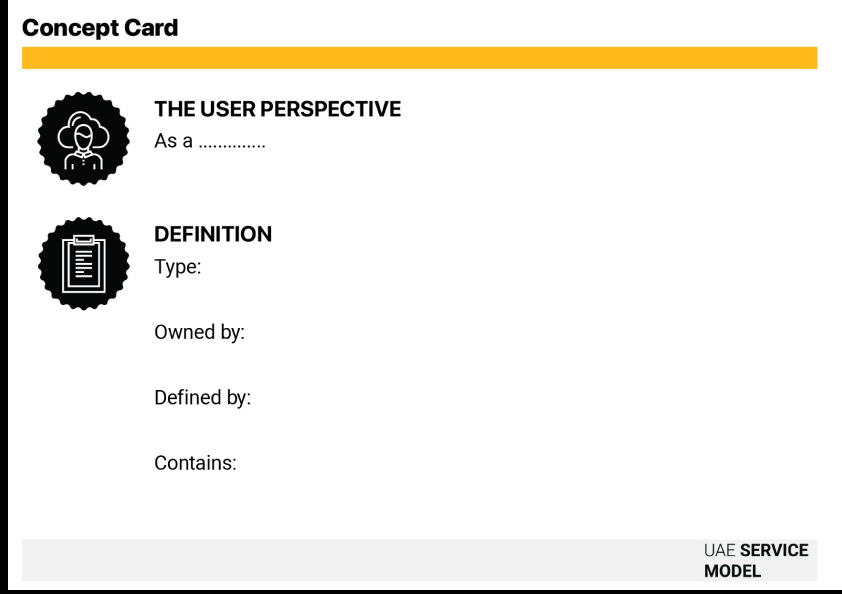
تُعد بطاقة المفاهيم التصوّري أداة ترجمة تربط بين منظور المتعامل (تجربة المتعامل) ومنظور البيانات (آلية عمل النظام). وفي حين يوضح مخطط الخدمة تسلسل آلية العمل، فإن بطاقة المفاهيم التصوّري تحدد العناصر داخل هذه الآلية. وتُلزم الأداة فرق العمل بتحديد المعنى الدقيق لكل فكرة داخل النظام، مثل: "المتعامل" أو "الطلب" أو "المشروع". ومن خلال توثيق الخصائص المحددة وتفاصيل ملكية البيانات والتعريفات لكل تصوّر في مرحلة مبكرة، يمكن تفادي الانفصال الشائع بين تصور فرق التصميم للميزات وبين قدرة البنية التحتية على دعم البيانات فعلياً.

1-2 ساعة لكل مفهوم

من المتوسط إلى المتقدم

التصميم والتطوير

خريطة رحلة المتعامل ومخطط الخدمة

نموذج بطاقة المفاهيم (رقمي أو مطبوع) ورؤى أبحاث المتعاملين ووثائق آلية تدفق البيانات والمتطلبات التنظيمية

مصممو الخدمات والمسؤولون عن المنتجات ومصممو الأنظمة وصناع السياسات وخبراء المحتوى
صف المفهوم من خلال تجربة المتعامل نفسه. وابدأ بعبارة بسيطة على النحو التالي: بصفتي [نوع المتعامل]، أريد [الهدف] حتى أتمكّن من [تحقيق النتيجة المرجوة]. يساعد ذلك على ضمان تركيز التصوّر حول المتعامل وتوجيهه نحو غاية واضحة.
وضح المفهوم من الناحية العملية أو آلية عمل النظام (مثل: حساب متعامل أو عملية تقديم طلب أو وحدة للآراء والملاحظات). بيّن كيفية عمله ضمن منظومة الخدمة الأوسع.
حدد الجهة أو الإدارة أو النظام المسؤول عن البيانات أو المهمة، ما يسهم في تعزيز الوضوح والمساءلة خلال مراحل التنفيذ.
أدرج البيانات أو المعلومات الأساسية المرتبطة بالفكرة، مثل: الاسم أو الهوية أو بيانات التواصل أو سجلات الاستخدام. احرص على أن تقتصر هذه الخصائص على ما هو ضروري لأداء المهمة بكفاءة وبما يراعي الاعتبارات الأخلاقية.
إذا كانت الخدمة متصلة بأنظمة قائمة أو منصات مشتركة (مثل قواعد البيانات الوطنية أو السجلات الحكومية)، اشرح كيفية توافقت هذه الفكرة مع التعريفات أو المعايير المعتمدة. تضمن هذه الخطوة تكامل البيانات والمهام بين الأنظمة المختلفة.
راجع بطاقة المفاهيم التصوّري المكتملة مع ممثلي الجهات والتقنيين لضمان وجود فهم مشترك وتوافق عبر مختلف المنظورات.
قبل البدء في التطوير، تحقق مما يلي: هل يوجد عنصر أساسي مرتبط بالخدمة (مثل تسجيل الدخول والدفع والآراء والملاحظات) أو واجهة برمجية متاحة مسبقاً لهذه المهمة؟ أدرج العناصر الأساسية القابلة لإعادة الاستخدام في هذه الخطوة.
توليد سمات البيانات: قدّم قصة متعامل إلى أداة الذكاء الاصطناعي (مثل: "بصفتي متعاملاً، أريد مشاركة تصميمي مع فريقي") واطلب: "لدعم هذا الاحتياج، ما سمات البيانات التي يجب أن يتضمنها "التصميم"؟ (مثل: قائمة المشاركة أو الصلاحيات أو الحالة)".
تحليل الفجوات: ارفع بطاقة المفاهيم مكتملة مع نص مخطط الخدمة إلى أداة الذكاء الاصطناعي واسأله: "هل تتضمن فكرة "الطلب" المذكورة هنا جميع حقول البيانات اللازمة لدعم خطوة "التحقق" في مخطط الخدمة؟"
احرص دائماً على تحقيق توازن بين لغة المتعامل وتعريفات النظام والبيانات.
تحقق مما إذا كان هناك مفهوماً مشابه موجوداً بالفعل ضمن جهة أخرى أو منصة مشتركة.
استخدم بطاقة المفاهيم التصوّري لتغذية النقاط المشتركة وآلية تدفق البيانات داخل مخطط الخدمة.
املأ الحقول بأمثلة بيانات حقيقية وواقعية لتعزيز الوضوح.
سيناريو مخصصات الطفل الاستباقية: يعمل فريق على تصميم خدمة لدعم الآباء الجدد.
منظور المتعامل (الاحتياج):
"بصفتي أباً جديداً، أريد الحصول على الدعم المالي الذي أستحقه تلقائياً، حتى أتمكّن من التركيز على طفلي حديث الولادة دون الحاجة إلى تعبئة طلبات".
آلية العمل التنظيمية (المهمة):
المهمة: نظام صرف استباقي (وليس "نموذج تقديم طلب").
المنطق: If Birth_Registry_Event = New_Entry AND Parent_Nationality = Local, THEN Trigger_Payment.
البنية التقنية (البيانات):
المسؤول عن مصدر البيانات: الجهة الصحية (سجل المواليد).
المتعامل الذي يحتاج البيانات: الجهة الاجتماعية (النظام المالي).
المعلومات المطلوبة: رقم الهوية الإماراتية للوالد وتاريخ ولادة الطفل ورقم الحساب المصرفي (يتم الحصول عليه عبر واجهة برمجة التطبيقات للمصرف المركزي).
من دون هذه البطاقة، كان فريق التصميم يرسم تصوّراً "لموقع إلكتروني جديد لتقديم الطلبات" (نموذج). وعند اطلاع الفريق التقني على بطاقة المفاهيم التصوّري، أوضح أن إنشاء موقع إلكتروني يُعد هدراً غير ضروري. وقد أسهمت ب طاقة المفاهيم التصوّري في توحيد الرؤية نحو بنية تقنية مختلفة تماماً قائمة على الأحداث وتعتمد على تكامل الواجهات البرمجية، بحيث يتم ربط نظام المستشفى مباشرة بالنظام المالي. وبذلك انتقل "المفهوم" من كونه موقعاً إلكترونياً إلى كونه إجراء غير مرئي يتم تفعيله في الخلفية، ما أسهم في تقليل وقت التطوير وتحقيق متطلب "عدم التدخل" الذي يحتاجه المتعامل.
مبادئ تصاميمنا المرتبطة ببطاقة المفاهيم.
مبادئ خدماتنا المرتبطة ببطاقة المفاهيم.