Use real-automation
Understand real-automation’s capabilities to accelerate the next generation of services.


The Service Blueprint is the "architectural drawing" of your service
The Service Blueprint is the "architectural drawing" of your service. While a Journey Map tracks what the user feels, the Blueprint maps how the service actually works. It provides a complete, X-ray view of the service by connecting the user’s actions to the internal operations, digital systems, and different government entities required to deliver the outcome. This tool is critical for designing Service Bundles. It allows you to see exactly where data must flow between departments to create a seamless experience, ensuring the service is not just desirable for the user, but operationally feasible and technically robust.

2-4 hours ( for one service flow)

Intermediate – Advanced

Design & Development

Journey map (recommended)

Digital collaboration board or printed template, process documentation, stakeholder input, system maps

Cross-functional team (service designers, process owners, IT leads, and frontline representatives)
The Blueprint is organised into rows called "swim lanes." Understanding them is key:
User/Customer Jobs (Goals and Subgoals): What the user is trying to achieve (e.g., "Receive Housing Grant"). Focus on their goal, not just clicks.
Channels/Touchpoints: Where the interaction happens (e.g., Housing App, Service Center Counter, SMS).
Onstage Service Actions: Everything the customer sees and interacts with directly.
Human: A frontline employee greeting the customer or checking a document.
Digital: The app interface displaying a success message or a chatbot answering a query.
Backstage Service Actions: The actions taken by staff or internal teams that the user does not see but are necessary to move the service forward. This is the domain of Frontline Consideration—ensure these invisible workflows (e.g., a back-office agent reviewing a complex application) are designed to be efficient and not manual bottlenecks.
Support Processes (Systems & APIs): The technical layer; mapping how databases, APIs, and payment gateways talk to each other to support the service.
Select one service or process to map — ideally one that involves multiple teams or systems. Clearly outline where the journey starts (e.g. application) and ends (e.g. utilities connected) from the user’s perspective.
Start at the top. What is the user trying to achieve at each step? List the steps the user takes to reach their goal.
For each job, list the specific Channel/Touchpoint they are using (e.g., Website, App, Service Center).
Describe the immediate response the user receives. Is a frontline employee speaking to them? Is the app displaying a form?
Identify the invisible human work. Does a staff member need to manually verify a document? Does a manager need to sign off? Look for ways to empower these staff members with better tools.
Go deep into the technical layer. Identify exactly how data moves. Critical Step: Explicitly identify where data is manually entered versus where it is (or could be) retrieved via an API. Look for opportunities to reuse existing components (like a shared login or payment module).
Once the map is full, "walk" through the blueprint as a team. Roleplay the Frontstage and Backstage actions simultaneously to see if the timing works. Does the Frontstage promise an instant result while the Backstage process takes 3 days? Mark these gaps.
Use the "Implementation Planning" QR Card to help identify risks and define responsibilities for the "Backstage" and "Support" layers of your blueprint, ensuring nothing is overlooked.
Draft Generation: Feed your User Journey text into an AI tool and ask it to "Draft a Service Blueprint table with columns for Frontstage, Backstage, and Support Processes." This gives you a structured starting point.
Bottleneck Analysis: Upload your draft blueprint text to an AI and ask: "Identify potential operational bottlenecks or data silos in this flow."
They know the reality of the "Backstage" better than anyone and can identify where the process usually breaks.
Use the "Support Processes" layer to highlight where you need to connect with other government entities (e.g., linking Housing to Electricity).
Clearly distinguish what is visible to the user versus what is internal. This helps you decide what to make transparent (e.g., status trackers).
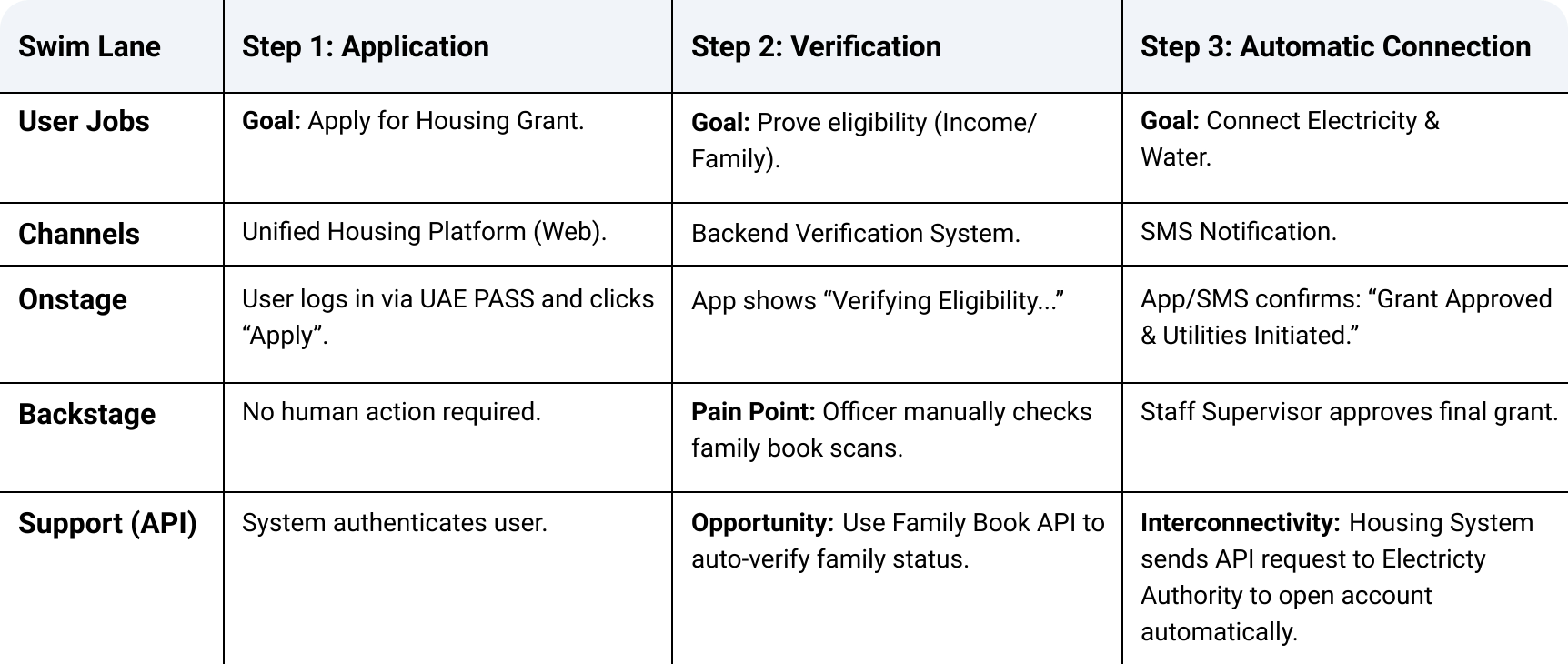
In this example, we map the journey of a citizen applying for a housing grant. The Blueprint reveals the hidden friction points that a simple Journey Map might miss:
Step 1 (Seamless Start): The user initiates the service easily via a digital channel.
Step 2 (The Bottleneck): The Blueprint exposes a critical inefficiency in the 'Backstage' layer: a staff member is manually checking family documents. This visual insight allows the team to identify the specific API solution needed to automate this step.
Step 3 (True Interconnectivity): The Blueprint maps the cross-entity connection. Instead of the user having to visit the Electricity Authority separately, the Housing system automatically triggers the utility connection, delivering a proactive and unified government experience.
In mapping the "Housing Grant" journey, the Blueprint revealed a critical inefficiency where staff were manually checking family documents. By identifying this gap, the team designed a solution where the Housing system automatically triggers an API request to the Electricity Authority. This exemplifies the Interconnectivity principle, as it moves beyond a single service improvement to create a unified, cross-entity ecosystem where data flows seamlessly to deliver a complete outcome.
Our design principles that relate to service blueprint.
Our service principles that relate to service blueprint.