Adopt human-centricity
Putting people at the centre of all our work.
The Persona Card transforms raw research data into relatable human profiles.
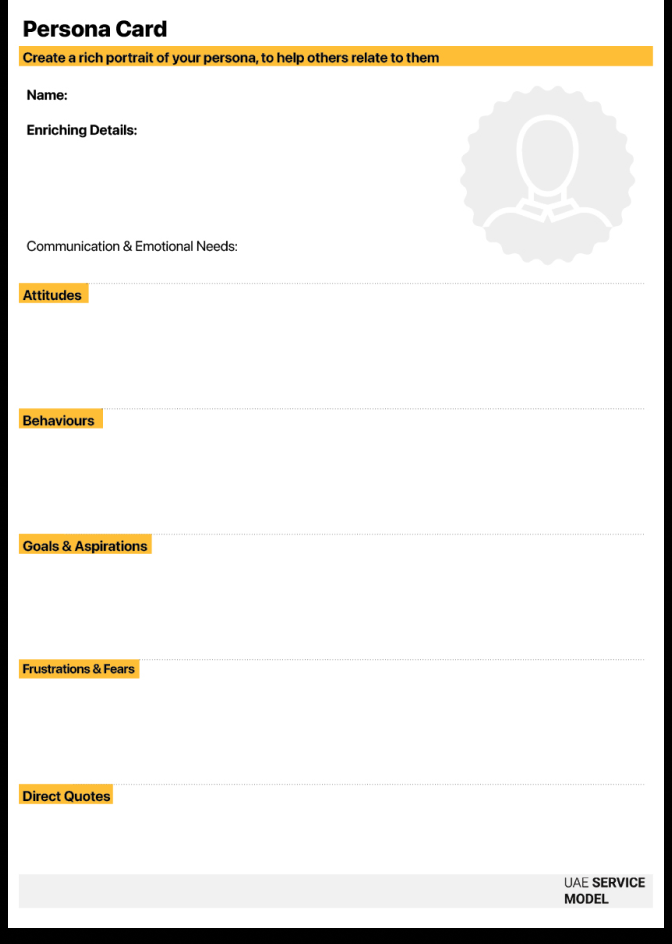
The Persona Card transforms raw research data into relatable human profiles. It helps teams visualize and empathize with specific user segments by capturing their goals, motivations, and behaviors. Instead of designing for a "generic user," this tool forces the team to design for specific people with specific needs. It aligns cross-functional teams around a shared understanding of who they are serving, ensuring that every decision—from policy to pixel—reflects real human diversity rather than internal assumptions.

1–2 hours (per persona)

Beginner – Intermediate

Discover & empathy

Research findings

Persona Card template (digital or printed), research insights, interview quotes, observation notes, photos or illustrations

Service designers, UX researchers, product owners, marketing and communication leads, frontline staff
Collect qualitative and quantitative data from interviews, surveys, analytics, and observations. Identify patterns in goals, frustrations, behaviours, and values across your user base.
Group users with similar motivations or challenges into meaningful segments — for example, first-time users, frequent users, or service providers.
Give each persona a name, role, and short description that humanizes them. Include a few enriching details such as demographics, occupation, digital literacy, and family or community context.
Note: While in the example below we use generic titles (e.g., "User A") to comply with privacy guidelines, your actual personas MUST use realistic human names. This is mandatory to create the psychological connection required for empathy.
Summarize how this persona approaches the service — their mindset, expectations, and daily routines. Are they skeptical, trusting, rushed, or confused? Include any emotional drivers that influence their decisions.
What do they actually do? (e.g., "Always prints documents as a backup," "Uses mobile only").
Goals (Short Term): What is the immediate functional need? (e.g., "Renew license today").
Aspirations (Long Term): What is the deeper desire? (e.g., "Feel independent and mobile").
Frustrations (Short Term/Pains): What are the immediate annoyances? (e.g., "Slow website," "Confusing text").
Fears (Long Term): What are the deep anxieties holding them back? (e.g., "Making a mistake that results in a fine or rejection").
Add short, memorable quotes from real research participants that illustrate their voice, attitude, or emotion. These humanize the persona and help others connect with them.
How does this person prefer to communicate? What tone (e.g. formal, empathetic, direct) makes them feel most comfortable? This is critical for designing AI agents and scripts.
Use the “Persona Creation” QR code to generate behavioral profiles based on your research inputs
Synthetic User Chat: Once you build a persona, feed it into an AI tool (e.g., "Act as the 'Returning Professional' persona...") and interview it. Ask: "How would you feel about this new feature?" to get a quick, rough validation of your ideas .
Pattern Recognition: Upload your raw interview notes to an AI and ask: "Identify 3 distinct user archetypes based on their motivations and frustrations in this text".
Base personas on actual user research, not assumptions or stereotypes.
Avoid idealized users — focus on representative behaviors and real challenges.
Three to five personas per project are typically enough to capture diversity without overwhelming the team.
Add "Enriching Details" (like family status, digital literacy, or commute time) to make the persona three-dimensional, but ensure these details are relevant to the service context. Don't just add fluff; add context that explains why they behave this way.
Represent differences in gender, background, ability, and digital literacy where relevant to the service context.
Use personas as entry points for mapping experiences, opportunities, and pain points in customer journeys.
Conflicting Needs in Employment Services Scenario: A government team is analyzing user needs for the National Employment Portal
Persona A: "The Returning Professional" (34 years old, re-entering workforce).
Attitude: Cautious and detail-oriented.
Latent Need: She fears that a small data error will disqualify her from senior roles. She needs the ability to review every detail carefully before submitting. To her, a "good service" is one that offers Control and Verification.
Persona B: "The Fresh Graduate" (22 years old, digital native).
Attitude: Impatient and multi-tasking.
Latent Need: He is frustrated by any step that takes more than two clicks. He trusts the system to work. To him, a "good service" is one that offers Speed and Automation.
By mapping these two personas side-by-side, the team realized they were facing two contradictory challenges, not one. If they optimized only for speed (Persona B), they would alienate Persona A. If they added too many review steps (Persona A), they would frustrate Persona B. This insight redefined their project scope: they stopped looking for a single "perfect flow" and started defining two separate challenges: How might we offer speed to the confident user while offering reassurance to the anxious one?
Our design principles that relate to persona card.
Our service principles that relate to persona card.