Think big
Bold, creative, and outside-the-box thinking.
The use of an AI prompt kickstart contributes to enhancing creativity and improving efficiency by integrating artificial intelligence technologies across various stages of the design process.
The use of an AI prompt kickstart contributes to enhancing creativity and improving efficiency by integrating artificial intelligence technologies across various stages of the design process. This tool supports service designers in effectively gathering insights, generating ideas, and testing concepts. It also enables teams to better understand customer requirements, analyse data, and co-create innovative solutions with AI systems. Furthermore, teams can leverage this tool to accelerate the design cycle, deepen their understanding of user needs, and identify innovation opportunities—while maintaining a strong human-centred focus at the core of the design process.

Continuous, adaptable to project stages

Beginner – Advanced

All phases (continuous)

None, can be used at any step

AI access (e.g., ChatGPT, Midjourney, DALL·E, Notion AI)

Individual designers or cross-functional teams (2–6 people)
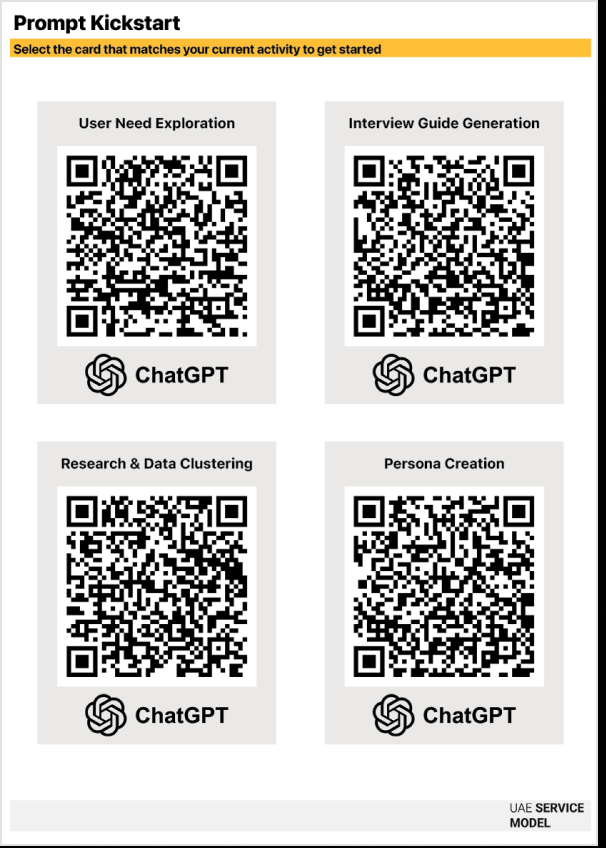
This toolkit includes a deck of cards. Each card features a specific title corresponding to a design task (e.g., "User Need Exploration") and a unique QR code that links to a tailored, expert AI prompt. Select the card that matches your current activity to get started.
Use this prompt to explore the problem space and uncover latent needs before conducting primary research. It helps you hypothesize potential pain points and workarounds to guide your investigation
Prompt: Act as a Senior Service Designer. I am exploring the problem space of [INSERT TOPIC/CHALLENGE].
Task:
List the top 5 potential 'Latent Needs' (unspoken desires or emotional drivers) users might have in this context, going beyond functional requirements.
List 5 potential 'Workarounds' users might currently be using (e.g., manual hacks, third-party tools) because a good government service doesn't exist yet.
Generate 3 'How Might We' questions that focus purely on the user's emotional experience, ignoring technology for now.
Output: Present the results as a structured list with a brief rationale for why each latent need is critical.
Ask AI to help you draft effective, non-leading interview questions. This prompt ensures your research focuses on uncovering deep motivations and behaviors rather than validating surface-level assumptions.
Prompt: Act as a Senior UX Researcher. I am investigating the experience of [INSERT USER GROUP] trying to [INSERT GOAL].
Task: Draft a semi-structured interview guide designed for a 45-minute session.
Requirements:
Warm-up: 2 questions to build rapport and understand their context.
Deep Dive: 5 open-ended questions that explore their underlying motivations, anxieties, and current workarounds. Constraint: Do NOT use leading questions (e.g., 'Do you like X?'). Instead, use behavioral questions (e.g., 'Tell me about the last time you...').
Wrap-up: 1 question to uncover missed opportunities.
Output: A formatted interview script with moderator notes on what specific signals to listen for.
Use AI to analyze your raw notes and identify patterns. This prompt moves you from messy data to clear themes, highlighting core challenges and unexpected findings.
Prompt: "Act as a Senior Research Analyst. I have gathered raw qualitative data regarding [INSERT TOPIC].
Task: Analyze the raw notes below to identify underlying behavioral patterns and root causes. Do not just summarize; interpret the data to find the 'why.'
[PASTE RAW NOTES HERE]
Output:
Issue Patterns: Identify 3 recurring themes where users consistently struggle or express frustration.
Core Challenges: For each pattern, define the root cause (is it a system barrier, a trust issue, or a communication gap?).
Unexpected Findings: Highlight 1-2 behaviors, hacks, or workarounds users are doing that we didn’t expect.
Strategic Implication: For each finding, suggest one high-level design opportunity.
Ask AI to enhance your draft personas based on research inputs. This prompt focuses on deepening the behavioural and emotional profile to ensure the persona represents a realistic user segment.
Prompt: "Act as a Behavioural Psychologist and UX Researcher. I have a draft persona and a set of research findings for a project about [INSERT CHALLENGE CONTEXT].
Task: Critique and enhance my draft persona to ensure it is realistic and fully aligned with the research.
Inputs:
Draft Persona: [INSERT DRAFT DETAILS]
Research Findings: [PASTE KEY FINDINGS]
Output:
Reality Check: Point out any details in my draft that feel like stereotypes or assumptions rather than facts.
Deepen the Profile: Rewrite the 'Latent Needs' and 'Attitudes' sections to specifically reflect the frustrations found in the research.
Context Alignment: Ensure the persona's goals directly conflict with the current service barriers, creating a realistic tension we need to solve.
Communication Style: Define the specific tone of voice and channel preference this persona responds to best."
Use prompts to identify the steps users take to achieve their goals. AI can simulate a user's emotional journey through the service and predict potential friction points to help you populate the Journey Map tool.
Prompt: Act as a Customer Experience Expert. I want to map the journey of [INSERT PERSONA NAME] trying to [INSERT GOAL].
Task: Simulate their emotional journey through the standard process. Break it down into 5 key stages (Awareness, Consideration, Action, Wait/Process, Completion).
For each stage, identify:
Actions: What are they physically doing? (e.g., clicking, walking, calling).
Thinking: What specific questions or doubts are in their head?
Feeling: Rate their anxiety/happiness on a scale of 1-10.
Friction Point: What is the most likely thing to go wrong here (system error, confusion, delay)?
Output: Present the results in a sequential timeline or structured table that comprehensively illustrates the customer journey.
Ask AI to suggest quick ways to bring your ideas to life. For visual outputs, use specific prompts with image-generation AI tools to create storyboards or interface mockups that represent the user flow.
After filling in the sections in bracket with your own input and data; copy and paste the entire completed prompt into Lovable to generate the clickable screens. Make sure all required fields are filled in and any assumptions are clearly noted before executing the prompt.
Option A: UX Flow & Clickable Wireframes
Prompt: "Create a UX flow represented as clickable wireframes for a digital product based on the details provided below. The wireframes should visualize the end-to-end user journey, from initial interaction through core use cases, emphasizing clarity, intuitive navigation, and alignment with the product’s value proposition. Use best practices for usability and accessibility. If any optional fields or documents are missing, make reasonable assumptions and clearly note them.
Input Fields:
App Description (required): [Briefly describe the app, its main purpose, and the core problem it solves.]
Key Steps of the Flow (required): [Briefly describe the main steps the UX flow should cover in sequence, as laid out in your Service Blueprint.]
Target Group Description (optional): [Who are the main users? Mention demographics, behaviors, or needs if known.]
Differentiating Promise (optional): [What makes this app stand out? What is the key value or emotional promise to users?]
Hygiene Features / Functions (optional): [List standard features expected in this app category — e.g., login, profile, notifications.]
Reasons to Believe (optional): [What features or functions deliver on the differentiating promise?]
Optional Uploads (Context): [Note: If using a tool that supports uploads, attach: Competitor Benchmarking, User Research/Personas, Value Proposition Canvas, Requirements, or Service Blueprint.]
Instructions for Missing Info: If optional fields or documents are not provided, proceed using assumptions based on UX best practices and standard interaction patterns for similar app types while differentiating from directly competing apps. Clearly label all assumptions.
Deliverables:
A clickable wireframe UX flow representing the user journey and main interactions.
A brief textual summary of the user flow.
Annotations highlighting assumptions, usability notes, and areas needing clarification."
Option B: High Fidelity Prototype
Prompt: "Create a high-fidelity clickable prototype with detailed screen designs for a digital mobile product based on the information below. The prototype should visually express the product’s core user experience, visual identity, and key interactions. Include realistic UI elements, typography, color, and layout choices consistent with the app’s purpose and audience. Use modern design principles, accessibility best practices, and visual consistency across screens, taking into account this will be a mobile app.
Input Fields:
App Description (required): [Briefly describe the app, its main purpose, and the problem it solves.]
Key User Flows (required): [List the essential flows to visualize — e.g., onboarding, product discovery, booking, checkout. Describe the main steps in sequence as laid out in your Service Blueprint.]
Target Group Description (optional): [Who are the primary users? Include relevant demographics, goals, or pain points.]
Differentiating Promise (optional): [What makes this app distinct? What is its core value or emotional promise to users?]
Hygiene Features / Functions (optional): [List expected baseline features typical for this type of app — e.g., login, profile, settings.]
Reasons to Believe (optional): [Which features or functions deliver on the differentiating promise above?]
Design Style (optional): [Describe the desired direction, e.g., 'clean and minimal,' 'playful and colorful,' 'enterprise data-rich,' or reference an existing brand style.]
Optional Uploads (Context): [Note: If using a tool that supports uploads, attach: Competitor Benchmarking, User Personas, Value Proposition Canvas, Service Blueprint, Brand Guidelines, Moodboards, or Reference Screenshots.]
Instructions for Missing Info: If optional fields or uploads are not provided, infer design and interaction choices from best practices for similar app types while differentiating from directly competing apps. Clearly label all assumptions.
Deliverables:
A high-fidelity clickable prototype showcasing the end-to-end user journey across key flows.
Detailed screen designs with realistic UI elements, typography, and visual style.
A short written summary describing the design rationale, user journey, and any assumptions.
Notes for iteration or decisions that may need stakeholder input."
Use prompts to design effective test plans, create user tasks, or simulate feedback from diverse user types. AI can help analyze results and identify key improvements.
Prompt: "Act as [Persona Name] using the profile provided below. Stay strictly in character. Your job is to critically evaluate my assumptions about an app concept. Do not assume the assumptions are correct; instead, look for where they might be wrong, incomplete, or only partially true for you.
Input Fields:
Persona Profile (required): [Paste the full text from your Persona Card here.]
App Description/Link (required): [Paste a short description or a link to the prototype.]
Assumptions to Test (required): [List the specific assumptions you want to verify, e.g., 'User wants to log in daily' or 'User understands the terminology'.]
Instructions: For each assumption, provide:
Gut Reaction: In 2–3 sentences, describe your immediate reaction as this persona.
Where it Breaks: List at least 3 ways this assumption could be wrong, risky, or not always true for you. Be concrete; refer to your habits, constraints, fears, and preferences.
Score: Rate how accurate this assumption feels for you on a scale of 1–10, and explain briefly why.
Design Implications: Suggest 2–4 specific changes (features, content, flows, pricing, etc.) that would make this assumption more valid from your perspective.
Deal-Breaker Scenario: Describe one situation where this assumption would fail so badly that you would stop using or ignore the app.
Please answer in the first person ('I…') and focus on honest critique and practical suggestions, not on being polite."
Use prompts to extend your analytical and creative capacity, not just for generating text. Let AI surface patterns or scenarios that might otherwise remain hidden.
Always cross-check AI outputs with user research and stakeholder input to ensure findings are grounded in real-world evidence.
When feeding user or organizational data into AI tools, ensure it is fully anonymized. You must remove any personally identifiable information (PII) such as names, Emirates IDs, or specific contact details to prevent privacy or compliance risks.
Translate AI-generated insights directly into other design tools, such as Personas or Service Blueprints, to ensure coherence across your project.
While AI accelerates synthesis and ideation, you must schedule time for human reflection. The value of AI is maximized when teams critically interpret its outputs and ensure they align with reality.
When generating content or scripts using AI, explicitly prompt for empathy, warmth, and a natural tone to ensure the result feels authentic and not robotic.
A team redesigning the citizen housing application process used the AI Prompt Cards during the Journey Mapping stage to analyze large volumes of feedback data.
AI synthesized user complaints and highlighted bottlenecks in communication and document submission.
By using the tool, the team identified redundant steps and opportunities for automation, reducing processing time by 35% and improving applicant satisfaction.
The AI Prompt Cards helped translate fragmented data into actionable service improvements.
Our design principles that relate to prompt kickstart.