

Testing
Test experiences, iterate, and improve.

What is usability testing
Usability testing is the evaluation process of a product. It is conducted by observing how a representative group of users interacts with it. This hands-on testing provides product developers and marketers with valuable insights into the user experience (UX) as perceived by individuals who are not familiar with the product.
The purpose of usability testing



Usability testing is iterative, involving multiple rounds of testing and incorporating feedback to continually improve the product’s usability based on user insights. To conduct a successful usability testing session, entities should:
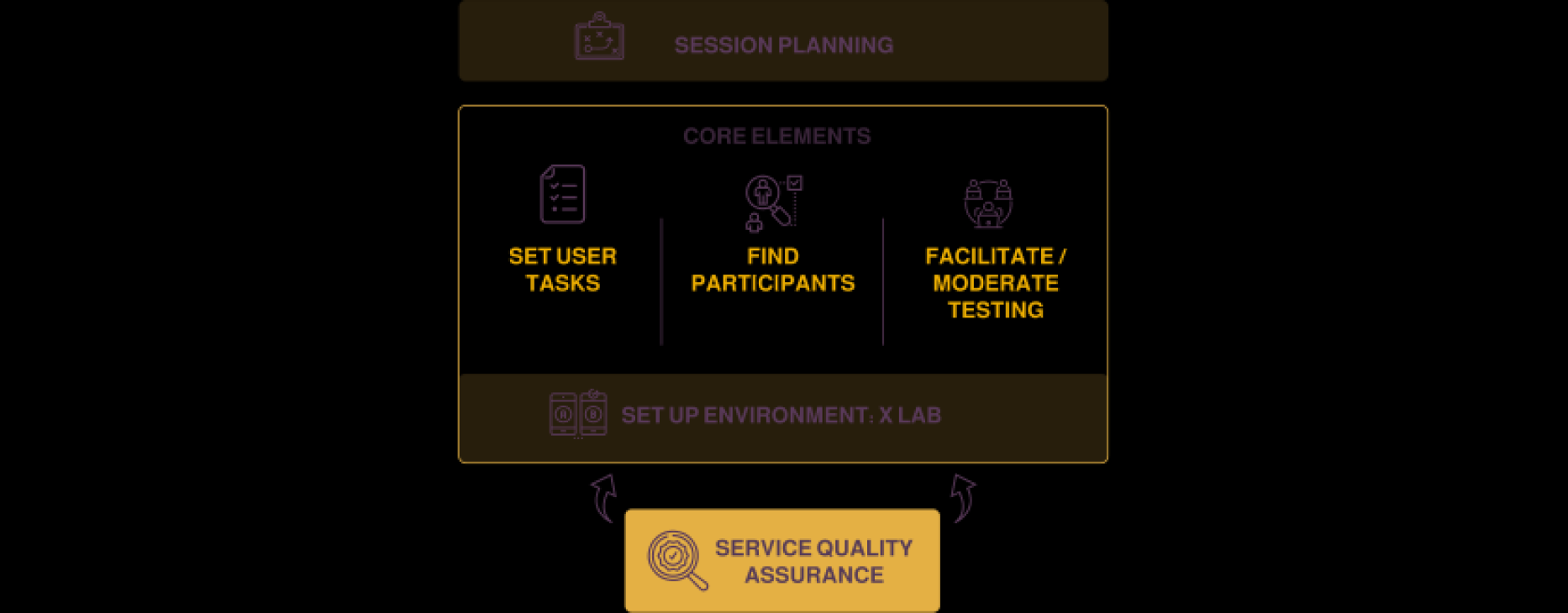
How to run a successful usability test?
-
Define what you want to test
Ask yourself questions about your design/ product. What aspect/s of it do you want to test? You can make a hypothesis from each answer. With a clear hypothesis, you’ll have the exact aspect you want to test.
-
Decide how to conduct your test
Define the scope of what to test (e.g. navigation) and stick to it throughout the test. When you test aspects individually, you’ll eventually build a broader view of how well your design works overall.
-
Prioritise the most important tasks to meet objectives
(e.g., complete payment), no more than 5 per participant. Allow a 60-minute timeframe.
-
Create scenarios where users can try to use the design naturally.
By providing personalised experiences and tailored service options, Hyper-personalisation can improve citizen engagement with government services and increase satisfaction with those services.
-
Find participants
Know who your users are as a target group. Use screening questionnaires to find suitable candidates. You can advertise and offer incentives. You can also find contacts through community groups, etc. If you test with only 10 users, you can still reveal 85% of core issues.
-
Facilitate/moderate testing
Observe and interview users. Notice issues. See if users fail to see things, go in the wrong direction or misinterpret rules. When you record usability sessions, you can more easily count the number of times users become confused. Ask users to think aloud and tell you how they feel as they go through the test. From this, you can check whether your designer’s mental model is accurate: Does what you think users can do with your design match what these test users show?
-
Set up a testing environment (UX lAB)
Use a suitable testing environment such as UX labs for the session. The controlled environment allows for regulation of factors like lighting and distractions, ensuring participants can focus on tasks and provide unbiased feedback. Usability testing labs are equipped with specialised tools and technologies, such as eye-tracking devices and screen recording software, enabling accurate analysis of user behaviour. The presence of observers in dedicated observation rooms allows stakeholders to directly observe user interactions and gain valuable insights. The labs also provides a collaborative space for analysing results and fostering communication among stakeholders.
-
Service quality assurance
Service Quality Assurance is an on-going and iterative process that encompasses various activities such as measuring customer satisfaction, monitoring service delivery processes, conducting audits, and implementing corrective actions to enhance service quality and ensure consistent and exceptional customer experiences. The ultimate goal is to maintain high standards of service and continually improve the quality of services offered by an organization.
Test experience, iterate, and improve
An omnichannel experience is a cohesive and consistent approach to customer interactions across multiple channels and touchpoints. It involves seamlessly integrating different channels like service centres, websites, mobile apps, and social media platforms to provide customers with a unified experience. By breaking down channel silos and synchronizing data, businesses can deliver personalised interactions, increase customer satisfaction, and foster long-term loyalty. Once the target experience is designed, entities need to test the product and run continuous improvement cycles, testing and iterating are essential steps in the process of Hyper-personalisation to ensure the best possible experience for users.
This can be conducted in two phases listed below:
Phase 1: Test
User testing
Conduct user testing with a diverse group of users to gather feedback on the experience. This can be done through in-person or remote sessions, surveys, or other methods.
Analytics
Use data analytics tools to track user behaviour and gather insights on how users are interacting with the experience. This can inform future design decisions and optimisations.
A/B Testing
Test different versions of the experience to see which one performs better. This can be done with small changes to the design, copy, or functionality.
Phase 2: Iterate and improve
Continuous improvement
Use the feedback and data gathered to make continuous improvements to the experience. This can include making small tweaks to the design or functionality or larger changes based on user feedback.
Agility
Use agile methodology to implement changes quickly and efficiently. This involves breaking down larger projects into smaller, manageable tasks and regularly checking in on progress and making adjustments as needed.
Usability testing
Usability testing involves observing users as they interact with the product. Usability testing can be conducted in person or remotely and can be used to identify usability issues and areas for improvement.